Introducing Guides: Onboarding Built from Your Google Docs
Step-by-step paths through the docs you already have, with progress for every person and a report for admins.

Onboarding usually starts with a list of links in chat. The handbook, the tools, the team pages, the security policy: all there, in no particular order, and nobody knows who actually read them. Today we are launching Guides in Spaceli: step-by-step paths through the docs you already have, with progress for every person and a report for admins.
What a guide is
A guide is an ordered set of pages from your spaces. A new hire's first week, a sales playbook, a client's getting-started path, a security training: anything people should go through in a certain order.
Guides don't copy your documents. Each step links to a page in a space, so when someone updates the Google Doc, every guide that uses it shows the latest version. There is nothing to rewrite and nothing to keep in sync.
Build a guide from your docs
- Start a guide. Open Guides in the header and click New guide. Give it a title, a short description and an icon.
- Add steps. Pick pages from any of your spaces, search across all of them, or select a folder to add every page inside it. Docs, Sheets, Slides, PDFs, videos and embeds such as Figma or Loom all work as steps.
- Put them in order. Drag steps around and group them into sections such as "First day", "First week" and "First month". Add a short intro to any step: what to pay attention to, or what to do next.
- Publish. Before the guide goes live, Spaceli shows who will see it and warns you about steps some readers can't open. Then copy the link and send it.
Each step also has a rule for when it counts as done:
| Rule | The step is done when | Good for |
|---|---|---|
| Reader confirms | The reader clicks Mark as done | Set up an account, read a policy |
| Page opened | The reader opens the page | A welcome video, a link to a tool |
| End reached | The reader scrolls to the end | A long doc that should be read in full |
What people see
The guide opens with an overview: what it's about, how far you are and every step. Click Start, and each page opens inside the guide, with all the steps in the sidebar and a bar at the bottom to move on.
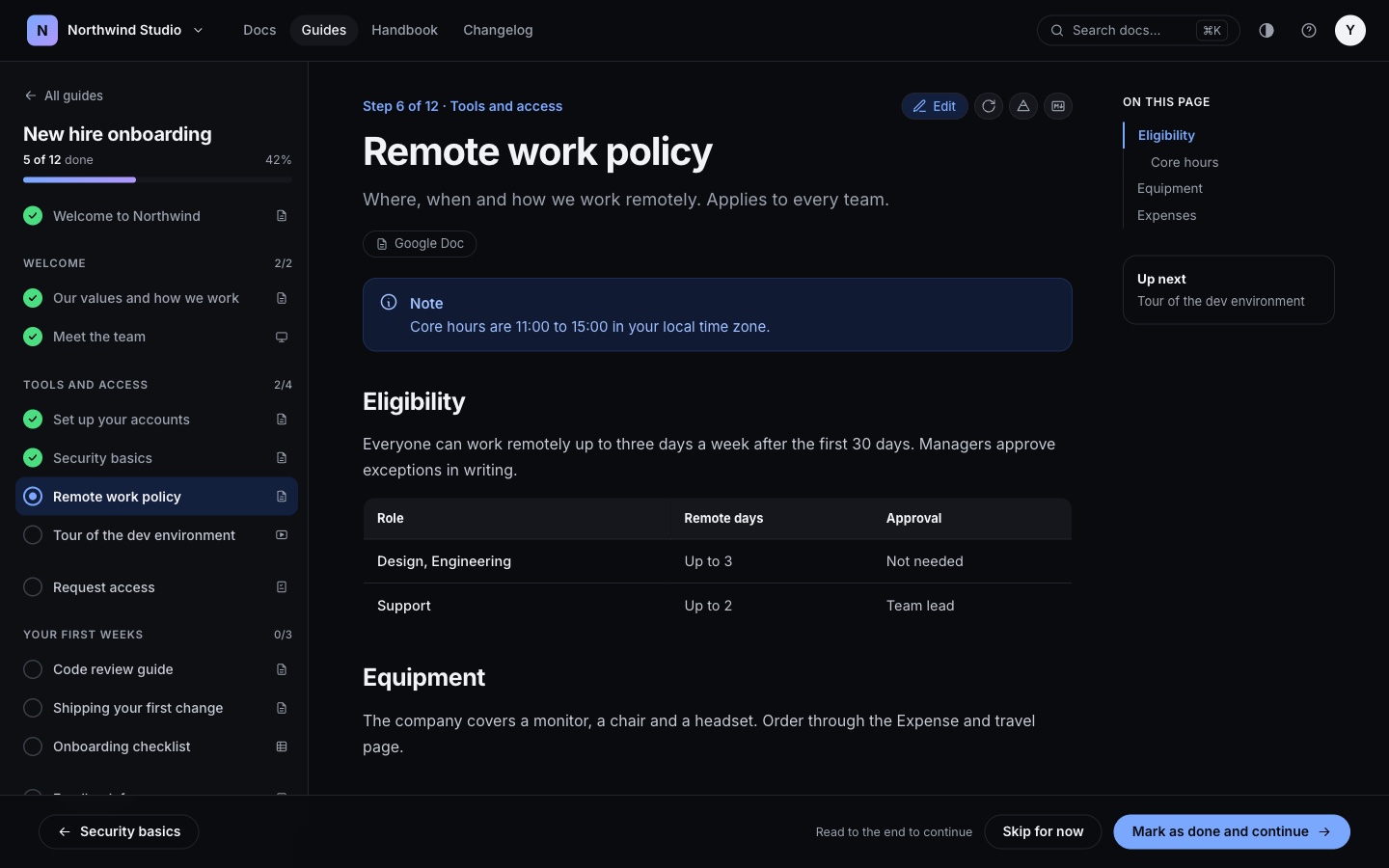
- Progress is saved as you go, on every device. Come back tomorrow and click Continue.
- Any order works. Open any step from the sidebar, or skip one for now and come back to it later.
- It works on a phone. The steps are one tap away, under the header.
- Space guides live in the space. They sit at the top of the space's sidebar, with your progress next to each one.
See who finished
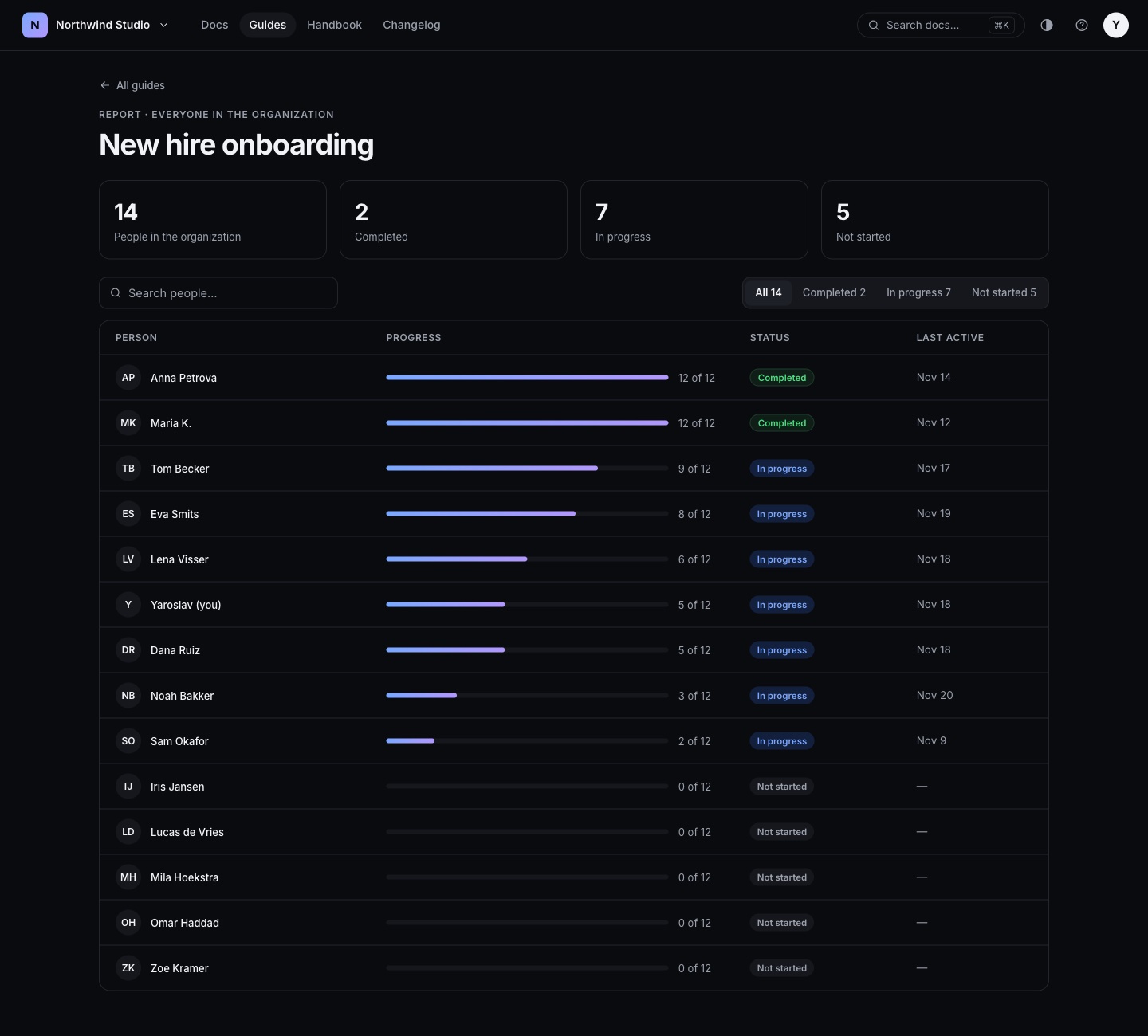
Every guide has a report for owners and admins: how many people can see it, how many completed it, are in progress or haven't started, and where each person is. Search by name and filter by status, so you can follow up with the people who haven't started instead of asking everyone.
Organization guides and space guides
- Organization guides are for everyone in your organization and can use pages from any space. Company-wide onboarding is the typical one.
- Space guides belong to one space and use only its pages. They're for everyone who can open the space, including clients you invited to it, which makes them a good fit for client onboarding or a team's runbook. Create one with Create, then New guide, inside the space.
Get started
Guides are available in every Spaceli organization today, on every plan. Owners and admins will find New guide in the Guides menu in the header. Start with the onboarding docs you already have: if they live in a folder in Google Drive, your first guide is a few minutes away. See how teams use them for onboarding and training, or start with our onboarding checklist template.
FAQ
Do guides copy our documents?
No. Every step links to a page in a space. Edit the Google Doc and every guide that uses it shows the latest version.
Who can create and see guides?
Owners and admins create guides. Organization guides are for the members of your organization. Space guides are for everyone who can open the space, including clients you invited to it.
Can we assign a guide to people or set a due date?
Not today. Share the guide's link with the people who should follow it, and use the report to see who has finished.
Can customers follow a guide without an account?
Not yet. Guides are for people in your organization, including clients invited to a space. Public spaces stay open to anyone with the link, but their guides don't.
Do guides cost extra?
No. Guides are part of every Spaceli plan, like every other feature.
Writes about wikis, documentation and how teams keep their knowledge easy to find.
Keep reading
All articles →How to Create a Wiki in Google Docs (Step by Step + Free Template)
Build a team wiki in Google Docs step by step: folder structure, home page, headings, links and permissions. Free template plus a faster way to do it.
Google Docs vs Confluence for a Team Wiki
Google Docs or Confluence for your team wiki? Editing, structure, search, access and pricing compared, plus a way to keep Docs and get Confluence-style structure.
The Best Tools to Turn Google Docs into a Wiki
Compare 4 tools that turn Google Docs into a wiki: Spaceli, You Need A Wiki, Tettra and Fulcrum Wiki. Drive access, features and pricing side by side.
Your knowledge base is already in Google Drive.
Give your team a better way to organize, find, and share knowledge. Keep your documents right where they are.
Start for FreeFree during the beta, no credit card required. Spaceli only accesses the folders you choose.
